Tutorial
How to Solve Adsense Error
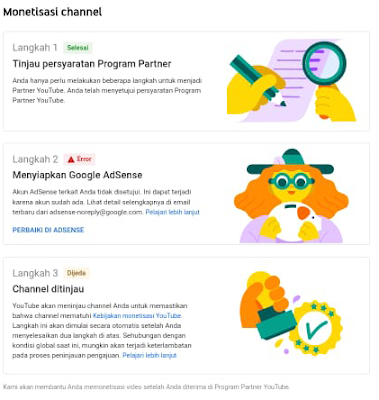
How to Solve Adsense Error
I will share my experience on how to solve failed to link youtube channels into adsense with an error description. For beginners or experienced YouTubers, this might be a little confusing, I'm quite dizzy myself.This problem is also proven to be experienced by many YouTubers.
I'll start this guide by briefly explaining why this problem occurs. I myself have actually been a youtuber for quite a while and have experienced an adsense account being banned. That's why I hope you don't want me to create a new adsense account using my sister's identity. So, this is where this problem comes from.
Along with the rise of YouTube, a lot of new YouTubers have sprung up and one of them is my sister. After creating a channel and meeting the requirements for monetization, immediately submit and as a result a problem arises in step 2 as shown in the image below. There is an Error article. The related AdSense account is disapproved.This can happen because the account already exists.
The main problem here is the domicile of electronic mail and the identity applied by my sister to register for adsense is identical to the adsense account that I already have. To make it easier to understand the illustration like this.
My sister makes adsense using email, for example = jokosantoso28@gmail.com. While the adsense account that I have created uses my sister's identity with the domicile email (for example) is jokosantoso70@gmail.com. Here the identity applied (KTP data) is exactly the same.Google detected that my sister's email, jokosantoso28@gmail.com, already has an adsense account, so when linking a Youtube account a notification appears like this: You already have an AdSense account.Thanks for your interest in AdSense. Did you know you already have another AdSense account that you could use? AdSense only allows one account per person.To get started with AdSense, you can either:.
The solution to this difficult situation is quite easy, so please link the YouTube email that you want to monetize to an existing Adsense account.If the youtube account is still personal, please change it to business first. A personal youtube account will not be able to add admins or administrators.Buddy still confused too? hehe.
The illustration is like this.Youtube account with email jokosantoso28@gmail.com we add admin by email jokosantoso70@gmail.com. So here the electronic mail jokosantoso70@gmail.com has become the owner. After that, we just need to apply for monetization. At the time of the monetization application, there is an option whether you already have an Adsense account, the answer has been and will automatically be advised to the Adsense account for that matter. Follow the next step.
I've experienced this also for the same case when creating my friend's adsense account. One identity is applied to create 2 adsense accounts. Google detects from domicile e-mail, identity name and domicile.The important point is the domicile of the email used.Make sure the domicile of the e-mail is completely different from the domicile of the existing e-mail.
Editor :Tim NP